
Monday to Saturday - 9:00 am -18:00 pm

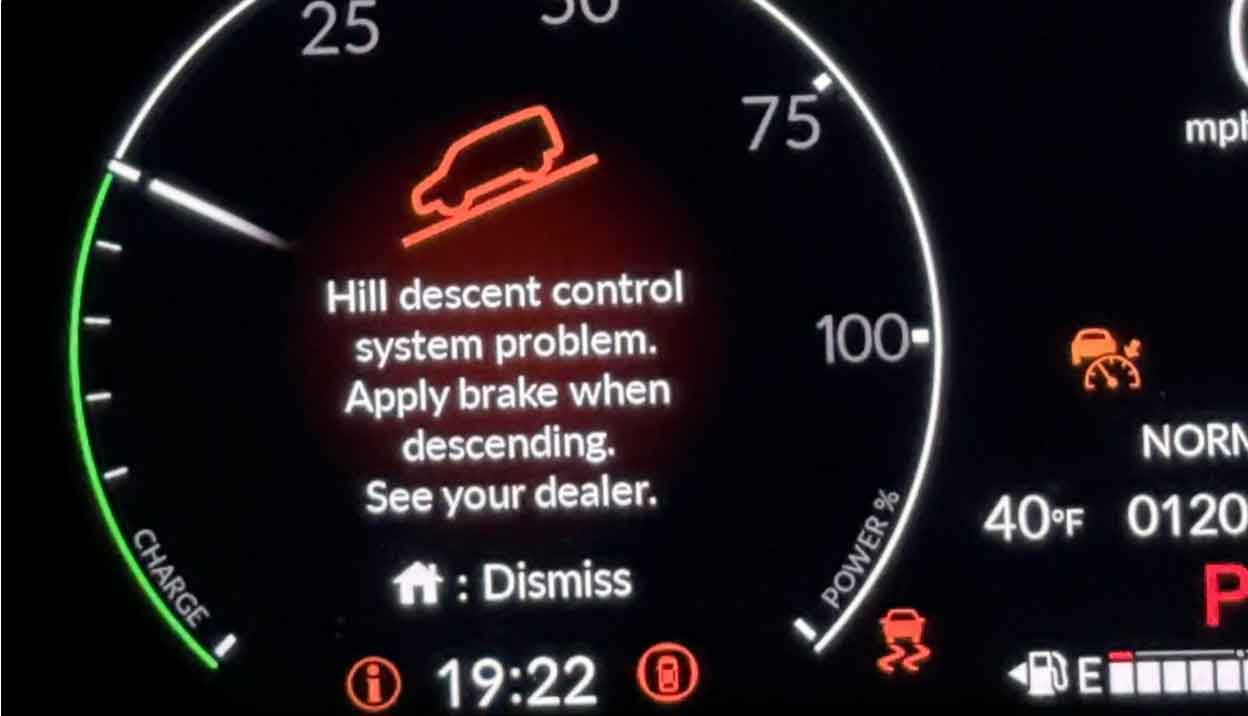
Your dashboard just lit up with a “Hill Descent Control Fault” warning. I know that sinking feeling—it happened to my own truck last winter on a steep mountain road.
Don’t panic. This warning means your vehicle’s downhill safety system needs attention. But the good news? Most fixes are simpler than you think.
Let me walk you through everything I’ve learned from diagnosing this issue hundreds of times in my shop.
What Is Hill Descent Control?
Hill Descent Control (HDC) is your vehicle’s automatic brake helper for steep slopes.
Think of it as cruise control, but for going downhill.
Here’s how it works:
When you activate HDC on a steep descent, the system takes over. It automatically pumps your brakes. This keeps your speed steady—usually around 4-8 mph.
You just steer. The system handles the braking.
From my experience: This feature is a lifesaver on slippery trails. I’ve used it countless times during off-road trips. It prevents that scary sliding feeling when gravity pulls you down.
Most modern SUVs and trucks have this system. Land Rover invented it back in the 1990s. Now Ford, Toyota, Jeep, and others include it too.
Why Does the HDC Fault Warning Appear?
The warning light comes on when your vehicle’s computer detects a problem.
Something in the HDC system isn’t working correctly. Your truck’s brain (the ECU) notices this and warns you.
In my shop, I tell customers this: Your vehicle runs constant self-checks. When HDC components fail these checks, the warning appears.
The system disables itself for safety. You can still drive normally. But you won’t have HDC assistance on steep hills.
Common Causes of Hill Descent Control Faults
Let me break down the usual suspects. These are the problems I see most often.
1. Low Battery Voltage
A weak battery is the number one cause in my experience.
When your battery voltage drops below 11.5 volts, HDC shuts down. The system needs strong electrical power to operate the brake actuators.
What I’ve noticed: Cold weather makes this worse. Batteries lose 35% of their strength in freezing temperatures.
Quick check: Start your engine. If it cranks slowly, your battery is probably weak.
2. Faulty Wheel Speed Sensors
HDC relies on wheel speed sensors to monitor each tire’s rotation.
These sensors get dirty from road grime, brake dust, and mud. Sometimes they fail completely.
From years under the hood: I clean wheel speed sensors on nearly every HDC diagnosis. It’s amazing how much crud builds up there.
The sensors sit behind each wheel. They read a toothed ring that spins with your tire.
When one sensor gives bad data, HDC can’t calculate proper brake pressure. The system faults out.
3. ABS System Problems
Hill Descent Control and your Anti-lock Braking System (ABS) work together.
If your ABS has issues, HDC won’t function.
Common ABS problems that trigger HDC faults:
- Failed ABS module
- Low brake fluid level
- Air in the brake lines
- Damaged ABS wiring
Pro tip: Check if your ABS warning light is also on. Two lights usually mean an ABS problem, not just HDC.
4. Brake System Issues
HDC needs your brake system in perfect shape.
Any brake problem can trigger the warning.
I’ve seen these brake issues cause HDC faults:
- Worn brake pads (less than 3mm remaining)
- Contaminated brake fluid
- Leaking brake lines
- Stuck brake calipers
- Malfunctioning brake booster
When I service a car like this: I always inspect the entire brake system. Sometimes the HDC fault is just a symptom of bigger brake problems.
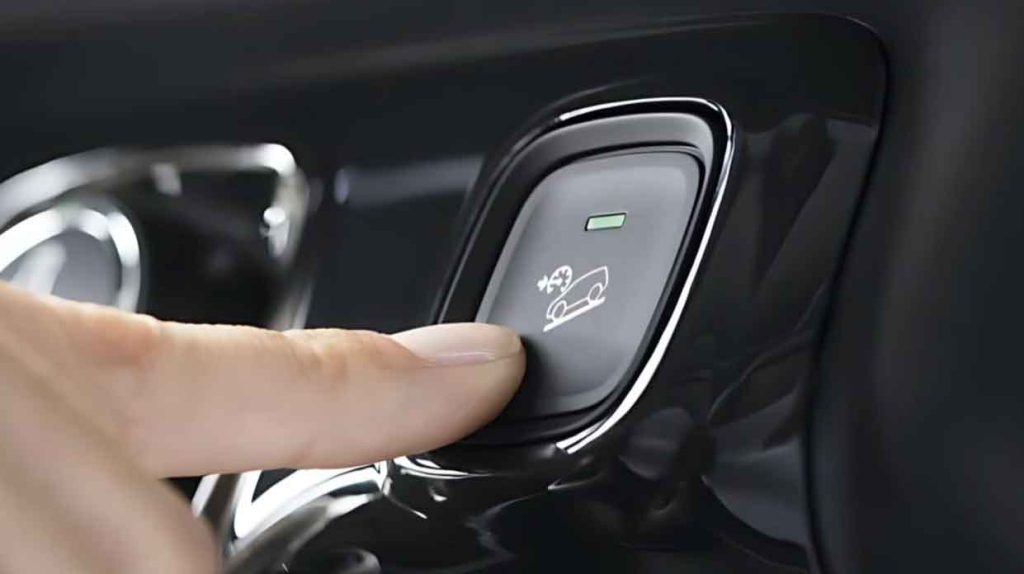
5. Bad HDC Switch or Button
The HDC activation button can wear out or malfunction.
This is especially true on older vehicles with high mileage.
What happens: You press the button, but the system doesn’t respond correctly. The computer sees mixed signals and throws a fault code.
I’ve replaced dozens of these switches. They’re usually on your center console or near the gear shifter.
6. Software Glitches
Modern vehicles run on complex software. Sometimes that software hiccups.
A random computer glitch can trigger a false HDC warning.
In my shop: We call these “ghost faults.” The system works fine, but the computer got confused.
A simple computer reset often fixes this. More on that later.
7. Faulty Hill Descent Control Module
The HDC module is the brain of the system.
When this component fails, you’ll need professional help.
Symptoms of a bad module:
- Warning light stays on constantly
- HDC never activates, even on steep hills
- Multiple fault codes stored
- System won’t reset after other repairs
Module replacement is expensive—usually $500 to $1,200 with labor.
8. Wiring and Connector Problems
Rodents love to chew wiring. Water corrodes connectors.
I find damaged wires regularly during HDC diagnostics.
Trouble spots I check:
- Under the hood near the ABS module
- Behind each wheel (wheel speed sensor wires)
- Under the vehicle (exposed to road salt and water)
Real example: Last month, a customer’s HDC fault was just a mouse-chewed wire. $80 repair instead of $800.
9. Terrain Response System Errors
Many vehicles link HDC with Terrain Response or Drive Mode systems.
If your terrain selector has a fault, HDC might disable too.
I’ve noticed this especially in:
- Land Rover vehicles
- Ford Expeditions and F-150s
- Toyota 4Runners with Crawl Control
Check if other drive mode warnings are active.
How to Diagnose Hill Descent Control Faults
Now let’s figure out what’s wrong with your specific vehicle.
Step 1: Check the Warning Lights
Look at your dashboard carefully.
Is only the HDC light on? Problem is likely in the HDC system itself.
Are multiple lights on (ABS, traction control, stability control)? The issue is probably in your braking or sensor system.
Write down every warning light you see. This helps with diagnosis.
Step 2: Test Your Battery
Grab a multimeter from any auto parts store ($15-30).
Here’s how to check:
- Turn off your engine
- Set the multimeter to DC voltage (20V setting)
- Touch the red probe to the positive battery terminal
- Touch the black probe to the negative terminal
- Read the voltage
What the numbers mean:
- 12.6V or higher = Good battery
- 12.4V to 12.6V = Battery needs charging
- Below 12.4V = Weak battery (likely your problem)
From my experience: Charge the battery overnight. Then retest the system. This fixes about 30% of HDC faults I see.
Step 3: Inspect Wheel Speed Sensors
You’ll need to remove each wheel to do this properly.
What to look for:
- Caked-on mud or metal shavings on the sensor
- Damaged sensor wiring
- Loose sensor mounting
- Corroded connectors
How I clean them:
- Remove the wheel
- Locate the sensor (looks like a small cylindrical component near the brake rotor)
- Spray with brake cleaner
- Gently wipe with a clean rag
- Check the toothed ring for damage
Don’t use metal tools on sensors. They’re magnetic and you’ll cause more problems.
Step 4: Check Brake Fluid Level
Pop your hood and find the brake fluid reservoir.
It’s usually on the driver’s side, near the back of the engine bay.
Check the level:
The fluid should be between the MIN and MAX lines. If it’s below MIN, you have a problem.
Warning: Low brake fluid often means worn brake pads or a leak. Don’t just top it off without investigating why it’s low.
Step 5: Scan for Diagnostic Trouble Codes
You need an OBD2 scanner for this step.
Budget option: Buy a basic scanner for $25-40 at any auto parts store.
Better option: Many auto parts stores scan codes for free.
What I use in my shop: A professional scanner like the Autel MaxiCOM or Launch X431.
How to scan:
- Plug the scanner into your OBD2 port (under the dashboard, driver’s side)
- Turn on the ignition (don’t start the engine)
- Select “Read Codes” on the scanner
- Write down every code it shows
Common HDC-related codes:
- C1A13 (Hill Descent Control Switch Circuit)
- C1446 (Wheel Speed Sensor Range/Performance)
- C0035-C0038 (Individual wheel speed sensor faults)
- U0415 (Invalid Data from ABS Module)
Each code points to a specific problem area.
Step 6: Test the HDC System
If you haven’t found the issue yet, test the system itself.
Find a safe, steep hill. An empty parking garage ramp works perfectly.
Test procedure:
- Start the engine
- Put the vehicle in Drive (or 1st gear for manual)
- Press the HDC button
- Does the button light up?
- Does the dashboard HDC indicator appear?
- Slowly drive down the hill
- Take your foot off the brake pedal
- Does the vehicle maintain a steady, slow speed?
What this tells you:
- If HDC activates and works = electrical glitch, not mechanical failure
- If HDC won’t activate = switch, wiring, or module problem
- If HDC activates but doesn’t control speed = brake system or ABS issue
DIY Fixes for HDC Faults
Some repairs you can handle at home. Others need a professional.
Fix 1: Reset the System
This is my first recommendation for intermittent faults.
Simple reset method:
- Turn off the engine
- Disconnect the negative battery cable
- Wait exactly 15 minutes
- Reconnect the cable
- Start the engine
This clears temporary computer glitches.
Success rate in my experience: About 25% of HDC warnings disappear after this.
Fix 2: Charge or Replace the Battery
A weak battery needs attention immediately.
Charging:
Use a trickle charger overnight. Don’t use jump-start chargers—they’re too aggressive.
Replacement:
Most auto parts stores install batteries for free when you buy from them.
Battery cost: $100-250 depending on your vehicle.
Pro tip: Always test the alternator too. A bad alternator won’t keep your new battery charged.
Fix 3: Clean Wheel Speed Sensors
I covered inspection earlier. Cleaning is straightforward.
Supplies you need:
- Brake parts cleaner ($6)
- Clean shop rags
- Wire brush (soft bristles only)
- Jack and jack stands
- Lug wrench
Process:
- Safely lift and support the vehicle
- Remove each wheel
- Locate the wheel speed sensor
- Spray generously with brake cleaner
- Let it soak for 2 minutes
- Wipe clean with a rag
- Check the wiring for damage
- Reinstall the wheel
Repeat for all four wheels.
Time required: About 1 hour for all four wheels.
Fix 4: Check and Add Brake Fluid
If your brake fluid is low (but you don’t see a leak):
Steps:
- Buy the correct brake fluid type (check your owner’s manual)
- Clean around the reservoir cap
- Remove the cap
- Add fluid slowly to the MAX line
- Replace the cap tightly
Important: Only use fresh brake fluid from a sealed container. Old fluid absorbs moisture and causes problems.
Warning signs you have a leak:
- Fluid drops under your vehicle
- Soft or spongy brake pedal
- Brake warning light is on
- You need to add fluid more than once per year
Don’t drive with a brake leak. Call a tow truck.
Fix 5: Update Vehicle Software
Manufacturers release software updates that fix known bugs.
Where to get updates:
Visit your dealership’s service department. Ask if any HDC-related software updates are available for your vehicle.
Some updates are free recalls. Others cost $100-200 for the service.
From my experience: Land Rover and Ford have released multiple HDC software updates over the years.
When to See a Professional Mechanic
Some HDC problems are beyond DIY repairs.
Go to a shop if you have:
- Multiple fault codes
- ABS warning light that won’t clear
- Spongy or soft brake pedal
- Grinding noises from wheels
- HDC warning that returns immediately after clearing
- No OBD2 scanner or diagnostic tools
What to expect at the shop:
A proper diagnosis takes 1-2 hours. Most shops charge $100-150 for diagnostics.
The mechanic will use professional-grade scanners. These show live data that basic scanners can’t access.
Common professional repairs:
- ABS module replacement: $400-800
- HDC module replacement: $500-1,200
- Wheel speed sensor replacement: $150-300 per sensor
- Brake system overhaul: $300-800
Always get a written estimate before approving repairs.
Preventing Future HDC Faults
Maintenance prevents most HDC problems.
My prevention checklist:
Regular Brake Inspections
Have your brakes checked every 15,000 miles or once per year.
This catches worn pads, low fluid, and sensor issues early.
Keep Wheel Speed Sensors Clean
If you drive off-road, clean sensors every 3-6 months.
Road salt and mud are the enemy of these sensors.
Maintain Your Battery
Test battery voltage twice per year—spring and fall.
Replace batteries older than 5 years, even if they still work.
Use HDC Regularly
Electronics need exercise too.
I recommend: Activate HDC once per month, even on mild hills. This keeps the system components moving and prevents corrosion.
Address Warning Lights Immediately
Don’t ignore dashboard warnings.
Small problems become expensive repairs when ignored.
Follow Scheduled Maintenance
Your owner’s manual lists specific service intervals.
Brake fluid flushes, battery tests, and system checks prevent surprises.
Frequently Asked Questions
Can I drive with the HDC fault warning on?
Yes, your vehicle is safe to drive normally.
You just won’t have Hill Descent Control assistance on steep slopes.
However: If other warning lights are on (ABS, brake system), don’t drive. Have the vehicle towed.
Will HDC fault cause other problems?
Usually no. HDC is a convenience feature, not critical for basic operation.
Exception: Problems causing the HDC fault (like ABS issues) might affect normal braking. Get it diagnosed soon.
How much does HDC repair cost?
Costs vary widely based on the actual problem:
- Battery replacement: $100-250
- Sensor cleaning: $50-100
- Sensor replacement: $150-300 per wheel
- Module replacement: $500-1,200
- Full brake system repair: $300-800
Money-saving tip: Start with the cheapest fixes first (battery test, sensor cleaning).
Does disconnecting the battery clear the HDC fault permanently?
Sometimes, but not usually.
A battery disconnect clears temporary glitches. If the underlying problem still exists, the warning returns within a few miles.
From my shop experience: About 1 in 4 HDC faults stay cleared after a battery reset.
Is HDC fault covered under warranty?
Depends on your warranty terms and vehicle age.
Typically covered if:
- Vehicle is under factory powertrain warranty
- You have an extended warranty that includes electronic systems
- The fault is due to a manufacturer defect, not wear and tear
Check your warranty paperwork or call your dealer.
Can cold weather cause HDC faults?
Absolutely. I see this constantly in winter.
Cold temperatures weaken batteries and affect sensor readings.
What I tell customers: If the warning appears only in cold weather and disappears when warm, your battery is probably marginal.
Will disconnecting the negative battery cable erase my radio presets?
Yes, unfortunately.
You’ll also lose:
- Radio station presets
- Clock settings
- Trip computer data
- Some seat memory settings (on luxury vehicles)
Write down your radio stations before disconnecting the battery.
Final Thoughts from a Mechanic
I’ve diagnosed hundreds of Hill Descent Control faults over the years.
The good news? Most are simple fixes.
Start with the basics: battery voltage, clean sensors, and a system reset. These solve more than half the HDC warnings I see.
If you’re not comfortable working on your vehicle, that’s okay. A professional diagnosis is money well spent. We have specialized tools and experience that make finding problems much faster.
My personal advice: Don’t let the warning light stress you out. Your vehicle is safe to drive. But don’t ignore it for months either—small problems grow into expensive ones.
Take action this week. Check that battery. Clean those sensors. Get it scanned for codes.
You’ll either fix it yourself or walk into a shop with valuable information that saves diagnostic time (and your money).
Stay safe out there. And remember—when that hill gets steep, HDC is your friend. Keep it working properly.
About the Author: With over 15 years turning wrenches in automotive repair shops, I’ve specialized in electrical systems and advanced driver assistance features. I’ve worked on everything from Land Rovers to Fords, and I’ve seen just about every HDC problem imaginable. My goal is to help you understand your vehicle and make informed repair decisions.