
Monday to Saturday - 9:00 am -18:00 pm

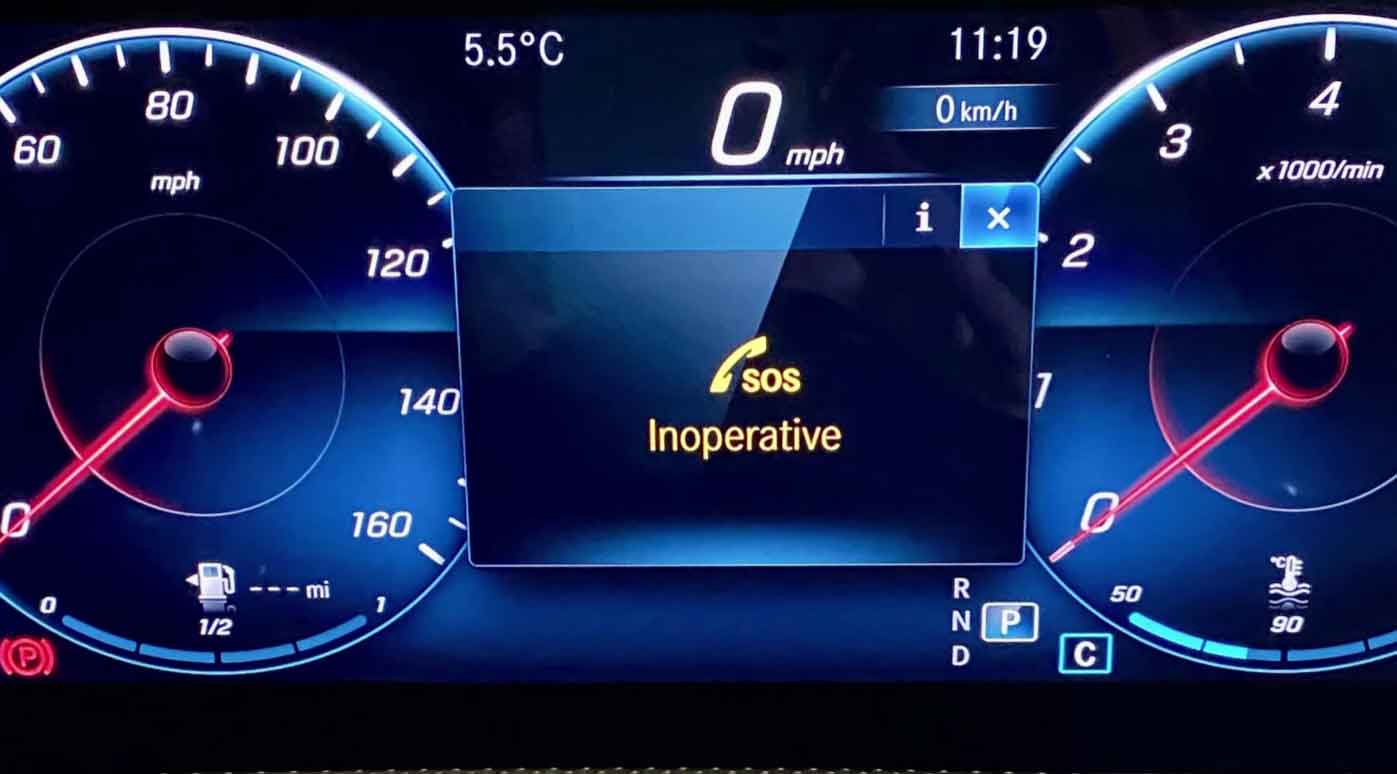
Understanding the SOS Inoperative Alert in Your Mercedes
Have you seen the “SOS Inoperative” warning pop up on your Mercedes dashboard? I’ll walk you through what this means and how to fix it.
From my years working on Mercedes vehicles, I’ve seen this issue many times. It’s more common than you think.
Mercedes-Benz builds some of the safest cars on the road. They pack each model with advanced safety tech. This includes their emergency calling system.
Whether you drive an E-Class sedan or a GLE SUV, your Mercedes has this feature. It’s designed to protect you when things go wrong.
Let me share what I’ve learned from diagnosing hundreds of these warnings in my shop.
What Does “SOS Inoperative” Actually Mean?
When this message shows up, your car can’t reach the Emergency Call System. That’s a problem.
The SOS feature connects your Mercedes to a help center. It kicks in automatically during a crash. Sometimes you can press the button manually too.
Think of it as a direct line to emergency services. When it works right, help arrives faster.
The system launched back in 2012. By 2014, Mercedes added it to every new car they made. It’s part of what they call Mercedes Me services.
Here’s how it normally works:
Your car detects a serious accident. The system calls the emergency center on its own. They get your exact location instantly. A voice connection opens up so you can talk. If you don’t respond, rescue teams get sent anyway.
But when “SOS Inoperative” appears, none of this works. Your emergency button is basically dead.
In my shop, I tell customers this is like having a smoke detector with no batteries. You need to fix it right away.
If you see this warning, visit a Mercedes dealer soon. They have the right scan tools to find the exact problem.
Why Does the SOS System Stop Working?
I’ve traced this warning to several different causes over the years. Let me break down what I see most often.
System Software Glitches
Software bugs cause a lot of headaches with modern cars. Mercedes has even recalled vehicles for this exact issue.
Back in one major recall, over 245,000 cars were affected. That’s a huge number.
These models had the problem:
Affected Mercedes Models
- CLA-Class
- GLA-Class
- GLE-Class
- GLS-Class
- A-Class
- E-Class
- S-Class
- C-Class
- AMG GT
- SL-Class
- GLC-Class
- CLS-Class
- GLB-Class
- G-Class
The SIM card module fails in many cases. This little card connects your car to the wireless network. Without it, no emergency calls go through.
Dead or Weak Battery
I check the battery first whenever this warning shows up. It’s the easiest fix.
Your Mercedes needs at least 12 volts to run the SOS system properly. When the battery drops below this, the warning appears.
Old batteries lose voltage over time. If yours is more than five years old, it probably needs replacing.
I’ve seen batteries test fine in the morning but fail by afternoon. Temperature changes affect them a lot.
Airbag System Issues
The SOS system connects directly to your airbag computer. Mercedes calls this the SRS (Supplemental Restraint System).
When something goes wrong with your airbags, the SOS stops working too. You’ll usually see both warnings together.
I’ve found bad crash sensors that triggered this. Sometimes the wiring under the seats gets damaged.
Old Communication Hardware
Mercedes updates their calling systems regularly. Older modules can’t connect anymore.
When you press the SOS button, nothing happens. The call fails before it even dials out.
I send customers to the dealer for what Mercedes calls an “Mbrace hardware update.” This refreshes the system.
Damaged Wiring
Wiring problems are harder to track down. The harness keeps all the wires organized and protected.
When these wires break or short out, the SOS system can’t function. Water damage causes this sometimes.
In my experience, rodents chewing wires is another common cause. I’ve pulled out nests from engine bays more times than I can count.
Finding wire damage takes time. You need proper wiring diagrams and a good test light.
How to Fix the SOS Inoperative Warning
Let me share the repair methods I use in my garage. These work for most situations.
Update the Software
Software glitches need software fixes. It’s that simple.
Take your Mercedes to a dealer with the latest diagnostic equipment. They connect to Mercedes servers and download updates.
This process usually takes 30 to 60 minutes. The technician will clear any error codes afterward.
I always recommend keeping your car’s software current. It prevents problems before they start.
Replace or Recharge the Battery
Testing the battery takes five minutes with a voltmeter. I keep one in my toolbox at all times.
If voltage reads below 12 volts with the engine off, charge it overnight. Use a smart charger that won’t overcharge.
Batteries older than four or five years should just be replaced. Don’t waste time trying to save an old one.
I’ve seen customers ignore weak batteries for months. Then they end up stranded somewhere. Replace it early and avoid the hassle.
Clear the Airbag System Codes
The SRS computer stores error codes when problems happen. You need a scan tool to read them.
I use a professional Mercedes scan tool in my shop. Generic code readers miss important data.
After fixing any airbag issues, clear all the codes. The SOS warning should disappear if that was the cause.
Common airbag problems include:
- Faulty door contact switches
- Bad impact sensors
- Loose connections under the seats
- Damaged seat belt pre-tensioners
Upgrade the Phone Module
The dealer handles this repair. They replace the old communication hardware with a newer version.
Mercedes sometimes covers this under warranty. Check with your dealer about any open recalls.
The new module works with current cell networks. Older ones can’t connect anymore as networks change.
Repair Wiring Issues
Wire repairs require patience and skill. I trace each circuit carefully using a wiring diagram.
Look for:
- Broken wires near moving parts
- Corrosion in connectors
- Pinched wires from body panels
- Rodent damage in the engine bay
Fix any damage with proper solder connections. Don’t just twist wires together. That causes problems later.
Wrap repairs with heat shrink tubing for protection. This keeps moisture out.
Watch This Repair Guide
[This would be where a relevant diagnostic video would be embedded]
A visual walkthrough helps if you want to try some diagnostics yourself.
Final Thoughts from the Shop
The SOS Inoperative warning means your emergency system is down. That puts you at risk.
In my years as a mechanic, I’ve learned one thing. Small problems become big ones when ignored.
Get this fixed quickly. Your safety depends on it.
Most repairs are straightforward. Software updates and battery replacements solve the majority of cases.
If the problem seems complicated, let a professional handle it. Mercedes systems need proper diagnostic tools.
I’ve covered the main causes and fixes you’ll encounter. Now you know what to expect.
Don’t put this off. Book an appointment with your Mercedes dealer or a trusted shop this week.
Common Questions About Mercedes SOS
What triggers the SOS warning in a Mercedes?
The warning appears when your car can’t connect to the emergency call center. Common causes include dead batteries, software glitches, airbag system faults, old communication modules, or damaged wiring. Each case is different.
Does the SOS button cost money to use?
No, the emergency call service is free. It’s included with your Mercedes. You won’t be charged for pressing the SOS button in a real emergency. The system is there to help keep you safe.
How do I turn off Emergency SOS on my phone when driving?
On Android phones, go to Settings, then Safety & Emergency. Find Emergency SOS and toggle it off. On iPhones, go to Settings, Emergency SOS, and disable Auto Call. This prevents accidental emergency calls while driving.