
Monday to Saturday - 9:00 am -18:00 pm

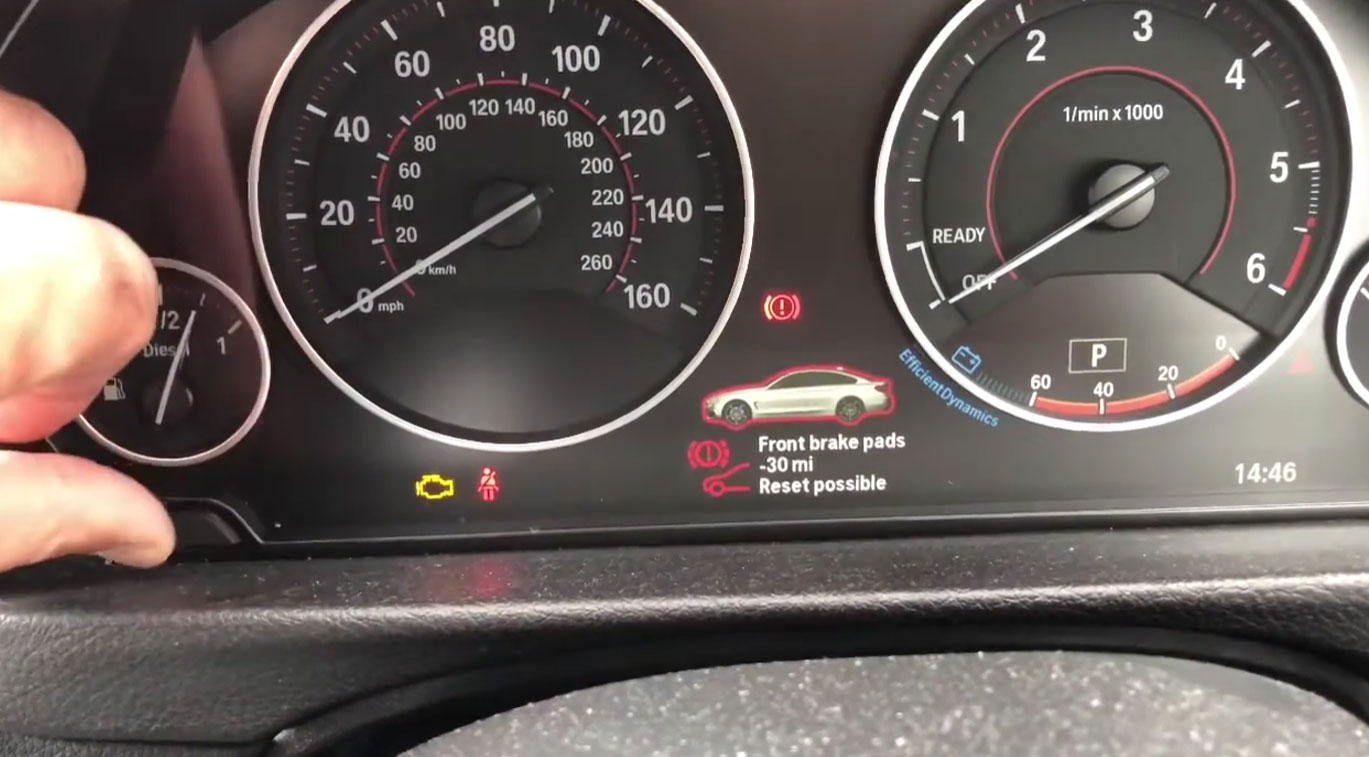
You see a light on your BMW dashboard. It might say “Brake Pads Low” or show a red warning diamond with a car symbol. Your stomach drops. Does this mean your brakes are failing right now? Do you need to stop immediately? Or can you drive to the shop on the weekend?
The answer: it depends on what you’re seeing. But in most cases, you have time—just not unlimited time. This guide will tell you exactly what your warning means and what to do today
What the Brake Pad Warning Light Actually Means
Your BMW has sensors on the brake pads. When the pads wear down thin enough, the sensor triggers a warning on your dashboard. That’s it. The light is saying, “Hey, pads are getting close to the minimum thickness. Replace them soon.”
This is not a brake failure warning.
This is not an emergency stop warning.
This is a maintenance reminder, like an oil change light—except brakes are more critical than oil changes.
Here’s the part that matters: BMW puts this sensor at a thickness where you still have 1,000 to 3,000 miles of safe braking left. The company is conservative on purpose. They want you to get them changed before pads get dangerously thin, not after.
Where are the sensors? There’s one on the front left pad and one on the rear right pad. So if you see a warning, check which end of the car it’s referring to. Some BMWs will tell you in the iDrive menu. If you’re not sure, assume one end needs checking.
Are There Two Different Warning Lights?
Yes. This is important.
The Yellow Warning (First Alert)
This is the early heads-up. The message might say:
- “Brake pads low—replace soon”
- Or display a car with a highlighted brake system
- It appears in yellow on the dashboard
What it means: You have time. The sensor has detected wear reaching a certain point, but you’re not in danger yet.
Urgency: Schedule service within 1–2 weeks. Don’t wait months. Don’t wait until the next service. Weeks, not months.
The Red Warning (Final Alert)
This is the second stage. The message might say:
- “Replace brake pads now”
- “Drive moderately—brake pads critical”
- It appears in red or bold on the dashboard
What it means: Pads are at or very close to the minimum thickness. The sensor has now fully engaged.
Urgency: Schedule service within days, not weeks. You can still drive the car, but braking power is already being affected. Every mile costs you pad material.
Special case: If you see a message that says the braking system itself is faulty (different from pad wear), pull over and stop. Call a mechanic. This is rare but serious.
How Long Is It Safe to Drive?
This is the question every owner asks, and here’s the honest answer: You don’t know without looking at the pads yourself.
But here are the real numbers from mechanics and forums:
- Yellow warning: 1,000 to 3,000 miles remain, usually closer to 2,000
- Red warning: 500 to 1,000 miles remain (sometimes as little as 100–200)
- Both warnings: Based on the last stage of wear, not a countdown timer. Your driving style, braking habits, and road conditions change the math
Example: Highway driving (light braking) stretches the miles. City driving (constant stopping) eats pads faster.
What I’ve seen in my shop: People get the yellow warning, wait 6 months, then get the red warning. Then they wait another month and hear grinding. That grinding is metal backing (the pad support) scraping on the metal rotor. Now they need new rotors too, which costs 2–3 times more.
Do not wait for grinding. Grinding means you’ve already damaged the rotor. At that point, you’re looking at $600–$1,200 instead of $300–$500.
Safe rule of thumb: When the yellow warning comes on, schedule service for the following week. You can drive the car normally until then. Make a phone call today. Don’t scroll for the cheapest price for two months.
Why the Warning Came On (And Sometimes It’s Not Worn Pads)
Ninety percent of the time: your pads are actually worn.
Ten percent of the time: something else triggered the light.
Real Worn Pads (Most Common)
Your pads are down to 3–5mm of material. This is normal at 30,000 to 70,000 miles depending on:
- How much you use the brakes
- City vs. highway driving
- Your driving style (hard brakers wear faster)
- Pad quality (cheap pads wear faster)
This is straightforward. Replace the pads. Problem solved.
Faulty Brake Wear Sensor (Less Common)
The sensor itself is broken or stuck. You see the warning, but the pads still have 5mm or more of material left.
How to know: A mechanic removes the wheel, looks at the pad thickness, and measures it. Pads should be about 12mm when new. If they measure 6mm or more, the sensor is faulty.
What happens: You must replace the sensor anyway, even if the pads are fine. The sensor is a one-time-use part that gets destroyed by heat and dust. Once triggered, it can’t be reused.
Cost: About $100–$200 for the sensor alone (sometimes included with new pads).
Electrical Problem (Rare)
A broken wire or loose connection in the brake warning circuit. This happens occasionally after brake work from another shop if wires weren’t reconnected properly.
What happens: The light comes on, but your pads and sensor are both fine. A mechanic runs a diagnostic test (usually 30 minutes) and finds the broken connection.
Brake Fluid Low (Separate Warning)
If your fluid level is low, you might see a different warning (often just the word “BRAKE” in red or the word “ABS”). This can happen if pads are worn (less fluid needed as pad material decreases) or if there’s a leak.
What to do: Check your brake fluid level with the small dipstick under the hood. It should be between the MIN and MAX marks. If it’s low, top it off. If it keeps dropping, there’s a leak. Get it checked immediately.
What to Do Right Now
Step 1: Don’t Panic
You have time to make a phone call and schedule service. You don’t have time to ignore it for six months.
Step 2: Call Your Mechanic or Dealership
Say: “My brake pad warning light came on. How soon can you get me in?”
- If you want OEM BMW pads and a dealership: book a week out.
- If you use an independent shop you trust: often 2–3 days.
- If it’s the red warning (not yellow): ask if they can fit you in sooner.
Step 3 (Optional): Look at the Pads Yourself
You don’t need special tools. You need a flashlight.
- Park on a level surface.
- Shine a flashlight through the wheel spokes at the brake pad.
- Look at how thick the friction material is (the dark part, not the metal backing).
- New pads are about 12mm. Below 3mm, they’re critical.
- If you see metal scraping metal, stop driving and get to a mechanic today.
If the pads still look thick (more than 5mm), the sensor might be faulty. Tell your mechanic when you call.
Step 4: Drive Normally Until Service
You’re not in danger. Brake normally. Avoid hard braking and extended downhill stretches if possible (they heat pads faster). Get to your appointment.
Cost and What’s Involved
What You’re Paying For
Brake pads: $150–$400 for a full set (front and rear), depending on OEM vs. aftermarket.
Brake wear sensor: $100–$200 per sensor (you usually need one, sometimes both).
Labor: $150–$300, depending on the shop and which brakes need work.
Rotor replacement (if needed): $300–$600 extra. This depends on whether the rotors are damaged.
Total typical cost: $400–$800 for pads and sensor, labor included.
Worst case (if you waited too long): $1,000–$1,500 if rotors need replacing too.
OEM vs. Aftermarket
OEM (BMW brand): More expensive, but matches original specs perfectly. No guessing.
Quality aftermarket (Textar, ATE, Brembo): Good quality, usually 20–40% cheaper. Mechanics often recommend these.
Cheap aftermarket: Don’t. You save $30 and risk worse braking and faster wear.
Front vs. Rear
Front pads wear faster (they do 60–70% of the braking work). You often replace the front first, then the rear later. Sometimes both need doing at once. A mechanic will tell you after inspection.
Common Mistakes Owners Make
Mistake 1: Waiting to See if the Light Goes Away on Its Own
It won’t. The sensor doesn’t reset itself. If anything, you’re just losing pad material every mile.
Mistake 2: Trying to Reset the Light Without Replacing Pads
Some owners find a YouTube video on “resetting the brake pad light.” This works temporarily—for maybe 1,000 miles. Then the light comes back because the pads are actually still worn.
Once the sensor is triggered (the light comes on), it’s burned. You can’t reuse it. You must replace it to permanently clear the warning.
Mistake 3: Ignoring the Yellow Warning and Waiting for Red
This costs you money. Yellow = “plan this week.” Red = “do this immediately.” The difference is a $200–$400 rotor replacement.
Mistake 4: Replacing Pads Without Checking Rotors
Worn rotors can make new pads perform worse and wear unevenly. A good shop checks rotor thickness during every brake job and replaces them if they’re below spec. Don’t let a mechanic “just do pads” if the rotors are worn. It’s false savings.
Mistake 5: Not Replacing the Wear Sensor
Some shops skip the sensor to save money. The warning light never clears. You drive around confused, and resetting doesn’t work. Replace the sensor. It’s not optional.
FAQ
Q: Can I drive 50 miles to a dealership I trust, or should I go to a closer shop?
A: 50 miles on a yellow warning is fine. On a red warning, you’re safer going to the closer option. Both options are fine if the mechanic is good. Don’t drive 200 miles for a specific shop; that’s excessive. Find someone good locally.
Q: The light came on, but my brakes feel normal. Should I still get them done?
A: Yes. Brake feel doesn’t change until pads are dangerously thin. By then, you’re close to rotor damage. The sensor is more reliable than your feel.
Q: How do I know if it’s the front or rear pads that are worn?
A: Your BMW’s iDrive menu usually tells you. If it doesn’t, the sensor location tells you: left front or right rear. If you’re not sure, a mechanic can diagnose it in 10 seconds.
Q: The light came on 6 months ago and I never did the work. Now what?
A: Get it checked immediately. You might have already damaged the rotors. Don’t wait. Call today. You’re looking at a longer repair now.
Q: Can I just replace the pads and not touch the rotors?
A: Sometimes. If rotors are above the minimum thickness and not warped, you can do pads only. A mechanic can measure and tell you. Don’t let anyone replace pads without at least checking rotor thickness.
Q: I had the pads replaced at another shop, and the light is still on. Why?
A: The new wear sensor wasn’t installed, or it wasn’t installed correctly. The sensor is part of every pad replacement. If your light stayed on after a brake job, go back to that shop. They missed a step.
Q: Is it safe to take a road trip with the red warning on?
A: Not really. Get the pads done first. A 500-mile trip with pads at minimum thickness is risky. A blowout, hard braking event, or steep downhill could overheat the pads and affect stopping power. It’s not worth the risk.
Q: How long do brake pads last?
A: 25,000 to 75,000 miles, depending on:
- Driving style (hard brakers: 25,000–40,000 miles)
- Road conditions (city traffic eats pads; highway preserves them)
- Pad quality (cheap pads: shorter; OEM: longer)
- Vehicle weight (heavier cars wear faster)
There’s no standard answer. The warning light will tell you when your car needs them.
Conclusion
The brake pad warning light is not an emergency. It’s a smart reminder from your car that maintenance is due.
Here’s what to remember:
- Yellow warning = book service this week.
- Red warning = book service this week, but prioritize it.
- You have 1,000–3,000 miles of safe driving left (usually).
- Waiting too long turns a $500 job into a $1,200 job (rotor damage).
- The sensor must be replaced along with the pads.
- Brakes are not the place to cheap out on parts or labor.
Don’t ignore it. Don’t panic. Pick up the phone and make an appointment. Get it done within the week. Your BMW will thank you, and so will your bank account.
Have you seen this warning light? What was the real cause? Leave a comment below—real owner experiences help other drivers.