
Monday to Saturday - 9:00 am -18:00 pm

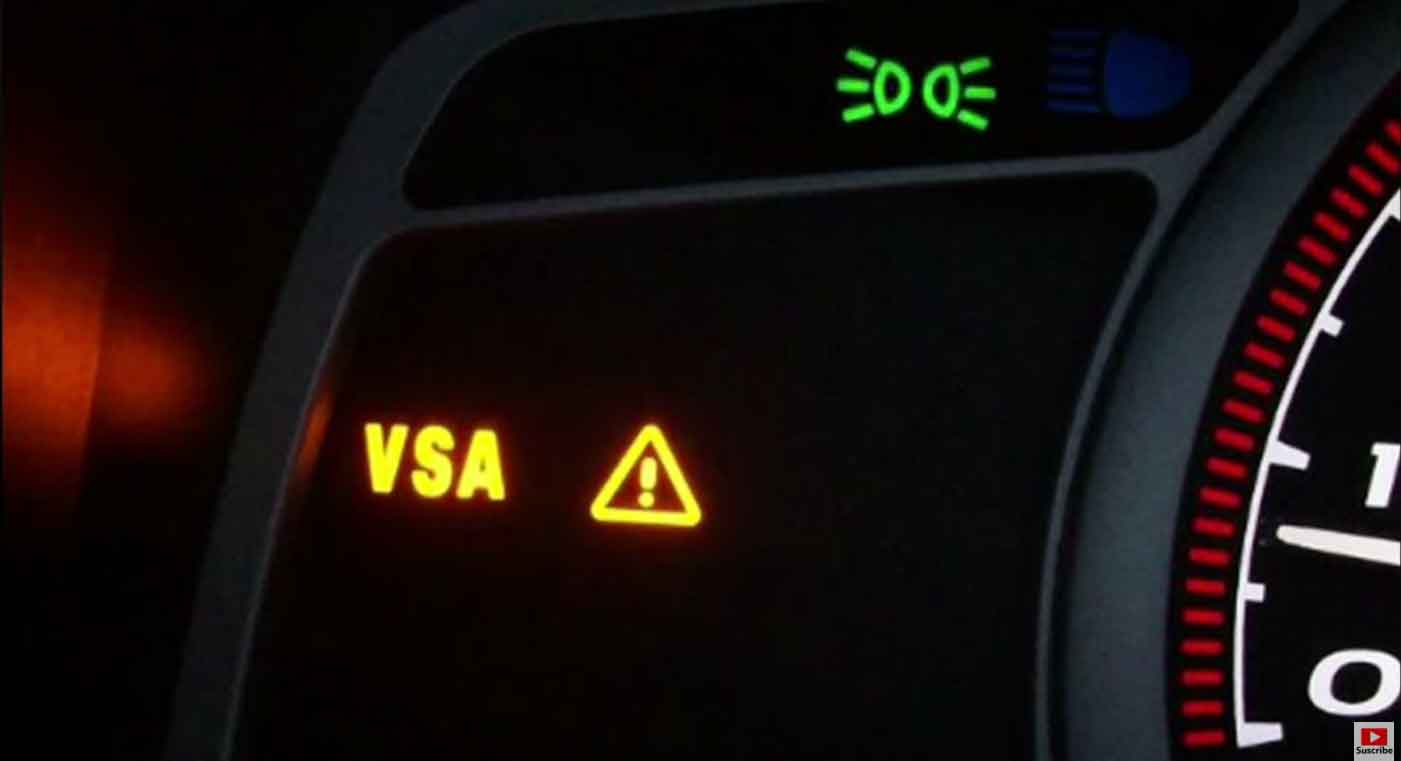
What Does “Check VSA System” Mean in Your Acura?
Driving your Acura and suddenly see “Check VSA System” flash across your dashboard? Your heart skips a beat. You wonder if it’s serious. Can you keep driving? What does this warning even mean?
This message confuses many Acura owners. You’re definitely not the first person asking these questions.
Your Acura’s VSA system works quietly every day. It keeps you safe without making a sound. But when that warning appears, something needs attention. The problem could be small and simple. Or it might need immediate care.
This complete guide explains everything about Acura’s VSA system. You’ll learn what causes the warning. We’ll show you how to fix it. Whether you drive an older TL or a brand new MDX, this information helps you.
Understanding VSA in Acura Vehicles
Vehicle Stability Assist (VSA) is Acura’s advanced safety feature. It helps your car stay controlled when roads get tricky. VSA prevents skidding and sliding. It works when you turn too fast or hit wet pavement.
This system does the same job as ESC (Electronic Stability Control). Other car brands call it different names. Toyota uses VSC. But they all work the same way.
When your VSA light blinks on and off, the system is actively working. It’s helping you right now. When the light stays solid and won’t turn off, something’s wrong. The system detected a problem.
Understanding these signals keeps you safer on the road.
How Your Acura’s VSA System Actually Works
Your VSA system uses multiple sensors throughout your vehicle. These sensors watch everything constantly. They check wheel speed, steering direction, and how your car leans in turns.
Here’s what happens behind the scenes:
The computer reads data from all sensors every millisecond. If your Acura starts going somewhere different than where you’re steering, VSA jumps into action. It cuts engine power instantly. It also applies brakes to specific wheels.
Key sensors that make VSA work:
Wheel speed sensors track each wheel’s rotation speed separately.
Steering angle sensor knows exactly where you’re turning the wheel.
Yaw and G-force sensors detect if your car starts spinning or sliding sideways.
When these sensors spot trouble, VSA responds faster than you can blink. It targets individual wheels with precise brake pressure. You might not even feel it working during normal driving.
From my years working on Acuras, I’ve seen this system save drivers countless times. It corrects problems before they become accidents.
VSA vs. Traction Control: What’s the Difference?
Many people think these systems are identical. They’re not. They work together but handle different situations.
Traction control stops your wheels from spinning when you accelerate. It helps on ice, snow, or muddy surfaces. It only works in straight lines when you’re speeding up.
VSA does much more than that. It manages your whole car during turns and emergency moves. When your rear end starts sliding out, VSA catches it. When you swerve suddenly, VSA keeps you stable.
Think about it this way: Traction control helps you go forward safely. VSA helps you turn and maneuver safely.
Do All Acura Models Have VSA?
Yes, almost every Acura built since the early 2000s includes VSA. Models like the MDX, RDX, TL, TSX, and ILX all come with this feature standard.
Newer Acuras definitely have it built in. Even older models from 2004 onward usually include VSA. Check your owner’s manual to confirm your specific model.
Why Does Your Acura Show “Check VSA System”?
This warning message appears for several reasons. Understanding what triggered it helps you fix the problem faster.
When the warning blinks quickly: Your VSA is working hard right now. You’re probably on a slippery road or making sharp turns. This is normal operation.
When the warning stays on solid: Either you turned the system off manually, or something malfunctioned. The system needs diagnosis.
When it appears during startup and won’t disappear: This usually means a sensor failed or something’s wrong with your brake system.
A solid warning light means VSA isn’t protecting you anymore. The anti-lock brake system might also be affected.
Common Causes Behind the VSA Warning
From servicing Acuras in my shop, I’ve identified the most frequent culprits:
Low Tire Pressure Issues
Your tires need proper air pressure to work correctly. When one tire runs low, it rotates at a different speed. This confuses the VSA sensors. They think you’re sliding.
What to do: Check all four tires. Inflate them to the pressure shown on your door sticker.
Brake Fluid Running Low
VSA relies on your brake system. Low brake fluid affects how everything responds. The system can’t function properly without adequate fluid.
What to do: Open your hood. Check the brake fluid reservoir. Add Honda/Acura-approved fluid if needed.
Weak Battery Voltage
When your battery drops below 12.4 volts, electronic systems act strange. VSA is sensitive to voltage drops. A weak battery triggers false warnings.
What to do: Test your battery with a multimeter. Charge or replace it if voltage is low.
Dirty or Broken Wheel Speed Sensors
These sensors sit near your wheels. They get covered in road grime, brake dust, and salt. When they’re dirty or damaged, they send wrong information.
What to do: Clean around each wheel speed sensor. Test them with a multimeter. Replace any sensor that reads incorrectly.
Blown Fuse
Your VSA system has a dedicated fuse (usually 40 amp). If this fuse blows, the entire system shuts down.
What to do: Find your fuse box. Check fuse number three. Replace it with the exact same rating if blown.
Damaged ABS Tone Ring
This metal ring sits behind your wheel. It has teeth that the sensor reads. If it cracks or gets bent, readings become inaccurate.
What to do: Inspect each tone ring carefully. Replace any that show damage or misalignment.
Can You Drive Your Acura With This Warning On?
The answer depends on what else is happening with your car.
When It’s Okay to Drive
You accidentally pressed the VSA OFF button. The system turned off intentionally. Just press it again to reactivate.
The warning blinks briefly during bad weather or sharp turns. This shows normal VSA operation.
Your car drives normally otherwise. No other warning lights appear. You can finish your trip and investigate later.
When You Should Stop Driving
Your car feels different. Acceleration seems choppy. Braking feels inconsistent. Steering responds strangely.
The warning appeared suddenly and won’t reset after restarting your engine.
Other warning lights appeared too. The ABS light or brake warning joined the VSA message. This signals serious brake system problems.
In my experience, driving with multiple warning lights is asking for trouble. Get your Acura checked immediately.
Checking Your VSA System Before Visiting a Mechanic
Save yourself time and money by trying these simple checks first. Many VSA warnings come from easy-to-fix issues.
Step 1: Inspect All Four Tires
VSA needs your wheels rotating evenly. Grab a tire pressure gauge. Check each tire against the recommended pressure.
Look at tread depth too. If one tire is much more worn than the others, that’s your problem. Make sure all tires are the same size and brand.
Mismatched tires are a common cause I see in my shop. Owners replace one tire and forget VSA needs consistency.
Step 2: Use an OBD-II Code Reader
Buy a basic scanner online for $20-30. Plug it into the port under your steering wheel. Pull any stored trouble codes.
VSA problems often generate specific codes. These codes tell you exactly which sensor or component failed. Write down the codes before clearing them.
This information is gold when talking to mechanics. It prevents unnecessary guessing and extra diagnostic fees.
Step 3: Test Your Brake Lights
This sounds too simple, but I’ve diagnosed countless VSA warnings traced back to bad brake bulbs. The brake pedal switch can also wear out.
Have someone press your brake pedal. Stand behind your Acura and watch. If any brake light doesn’t work, replace that bulb first.
On older Acura models, the brake switch itself goes bad. This makes VSA think you’re braking randomly.
When Should You Call a Professional Mechanic?
Some situations need expert diagnosis and repair equipment.
If your warning keeps returning after you’ve checked everything above, see a mechanic. Persistent warnings mean deeper problems exist.
When your Acura drives strangely along with the warning, don’t wait. Uneven braking during turns signals sensor problems. Loss of stability means failed components.
Multiple warning lights together (VSA + ABS + Brake) require immediate professional attention. These systems connect together. Driving without them working is dangerous.
Advanced diagnostic scanners in shops read data regular code readers can’t access. We can see live sensor readings and pinpoint failures precisely.
Turning VSA On and Off in Your Acura
Your VSA button sits on your dashboard or center console. You can disable the system when needed.
Press and hold the VSA button for about 5-10 seconds. You’ll hear a beep. The light will blink briefly. Now VSA is off.
When might you turn it off? Getting unstuck from deep snow or mud sometimes requires wheel spin. VSA prevents that. Turning it off temporarily helps you get moving.
But here’s important advice from my shop experience: Turn VSA back on immediately after. Don’t drive around with it off. The system exists to protect you.
VSA automatically reactivates when you restart your engine. This safety feature ensures you don’t forget to turn it back on.
Maintaining Your Acura’s VSA System
Prevention beats repair every time. These simple maintenance habits keep VSA working perfectly.
Keep Sensors and Wheels Clean
Road salt, mud, and brake dust coat your wheel sensors. This buildup causes false readings and warnings.
Wash your wheel wells regularly. Spray behind each wheel. Pay attention during winter months when salt accumulates.
Use matched tires on all four corners. Don’t mix brands, sizes, or tread patterns. VSA hates mismatched wheels.
Check tire pressure monthly. Keep all four tires at the same pressure. Even small differences trigger warnings.
Be Careful With Aftermarket Modifications
Bigger wheels, lowered suspension, and aggressive alignments throw off VSA calibration. The system was programmed for factory specifications.
If you modify your Acura’s suspension or brakes, expect to need recalibration. Some shops can reprogram VSA. Others can’t.
Cheap LED brake lights sometimes cause electrical interference. This triggers false VSA warnings. Stick with quality parts.
If you’re tuning your engine, make sure your tuner understands VSA integration. Poor tuning causes system conflicts.
Stay Current on Regular Maintenance
Replace brake fluid every three years. Old fluid absorbs water. This affects how VSA and ABS respond.
Have wheel speed sensors cleaned during brake service. Especially important after 100,000 miles.
Test your battery regularly. Weak batteries cause random warning lights across all systems.
From maintaining hundreds of Acuras, I’ve learned that basic care prevents most VSA problems.
Acura-Specific VSA Issues to Watch For
Different Acura models have unique weak points. Knowing yours helps you stay ahead of problems.
Common Problems in MDX and RDX Models
Yaw sensor failures happen frequently in 2007-2012 MDX and RDX models. The yaw sensor sits under your center console. When it fails, you get constant VSA warnings during turns.
Replacement requires removing interior panels. It’s not a quick fix. Expect 2-3 hours of labor.
TL and TSX Specific Concerns
Steering angle sensor issues plague older TL models. The sensor wears out from constant use. It sends incorrect data during tight turns.
Replacing this sensor requires steering wheel removal. Some models need recalibration afterward with special tools.
Battery Voltage Problems Across All Models
Acura’s sensitive electronics hate weak batteries. When voltage drops in cold weather, VSA warnings appear randomly.
I’ve seen this in countless Acuras during winter. The car seems fine otherwise. New battery makes warnings disappear.
Maintenance Tips Specifically for Acura Owners
Use OEM or premium brake components only. Cheap brake pads throw off ABS and VSA balance. I’ve replaced many sensors that weren’t actually bad. The real problem was poor-quality brake parts.
Get wheel alignment checked annually. Acura suspensions are tuned precisely. Worn bushings or bad camber causes weird VSA behavior.
Always reset TPMS after tire rotation or replacement. Uneven tire pressure readings confuse stability systems.
Acura’s VSA is extremely capable. It’s built for performance and safety. But it demands precision. Stay on top of maintenance. The system will protect you silently for years.
Understanding Repair Costs
VSA repairs vary widely depending on what failed. Here’s what to expect:
Minor fixes like cleaning sensors or replacing bulbs: $50-150
Wheel speed sensor replacement: $150-300 per wheel
Yaw sensor replacement: $300-600 including labor
Steering angle sensor: $250-500 depending on calibration needs
Complete VSA/ABS module replacement: $800-1,500 or more
Always get quotes from multiple shops. Some dealers charge significantly more than independent mechanics for identical work.
Frequently Asked Questions
What causes VSA system failure?
Sensor failures are the most common cause. Electrical problems come next. Brake system issues and failed VSA modules are less common but more serious.
Is it safe driving with Check VSA System warning?
It depends. If your car drives normally and no other warnings show, you can drive carefully to get help. If you notice strange handling or see other warning lights, stop driving.
How much does VSA system repair cost?
Simple fixes cost $50-150. Sensor replacements run $150-600. Complete module replacement costs $800-1,500 or more.
Why do people turn off VSA?
The main reason is getting unstuck. VSA prevents wheel spin. Sometimes you need wheels to spin to escape snow or mud. Otherwise, keep VSA on always.
Can I fix VSA problems myself?
Some issues yes. You can check tire pressure, clean sensors, and replace bulbs. But sensor replacement and calibration need special tools. Advanced electrical problems require professional equipment.
What does VSA warning with triangle mean?
The triangle with exclamation point indicates critical stability control problems. It often appears with brake system warnings. This combination needs immediate professional attention.
Final Thoughts From a Mechanic’s Perspective
Seeing “Check VSA System” on your dashboard isn’t something to ignore. This warning means your safety systems need attention.
I’ve worked on Acuras for years. VSA saves lives when it works properly. Don’t risk driving without it functioning correctly.
Start with simple checks at home. Many VSA warnings come from easy fixes. But if the warning persists or your car drives strangely, see a professional mechanic immediately.
Catching small problems early prevents expensive repairs later. A $100 sensor replacement today beats a $1,500 module replacement next month.
Take care of your Acura’s VSA system. It takes care of you every time you drive. Stay safe out there!