
Monday to Saturday - 9:00 am -18:00 pm

Introduction
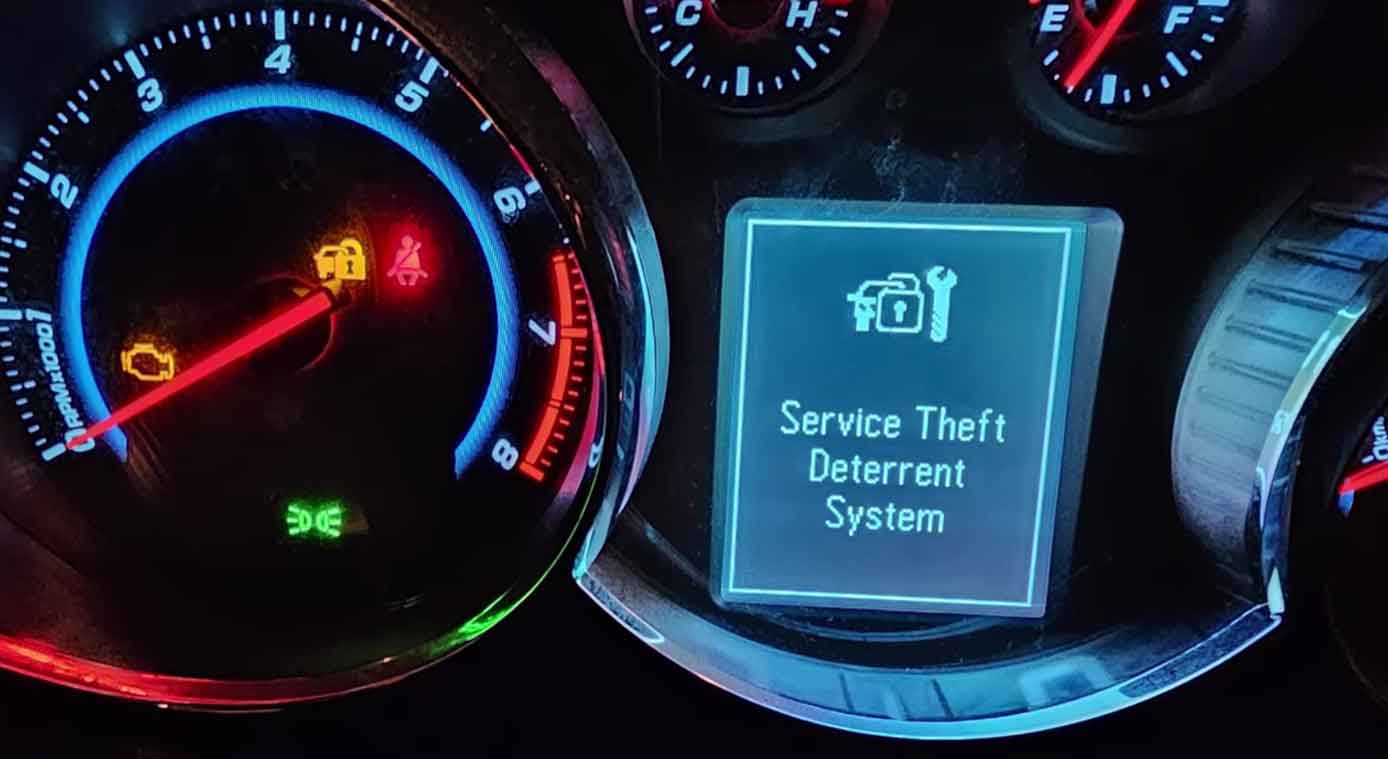
Your Chevy Cruze won’t start. The dashboard shows a strange message: “Service Theft Deterrent System.”
This warning stops many drivers in their tracks. I’ve seen this issue dozens of times in my shop.
The theft deterrent system protects your car from thieves. But when it malfunctions, you can’t drive anywhere.
In this guide, I’ll explain what this system does. You’ll learn why the warning appears. I’ll also show you how to fix it.
Let’s get your Cruze running again.
What Is the Theft Deterrent System in Chevy Cruze?
The theft deterrent system is your car’s security guard. It stops unauthorized people from starting your vehicle.
General Motors calls it the “Passlock” system. Some models use a different version called “VATS.”
Here’s how it works: Your key has a special chip inside. When you turn the key, the system reads this chip.
If the chip matches, your car starts. If it doesn’t match, the engine stays off.
From years under the hood, I can tell you this system is usually reliable. But electrical problems can trigger false alarms.
The system includes several parts:
- Key transponder chip
- Steering column sensor
- Body control module (BCM)
- Engine control module (ECM)
When any part fails, you see the warning message.
Common Symptoms of Theft Deterrent System Problems
The main symptom is obvious: your car won’t start.
But there are other signs too. Watch for these issues:
Security Light Stays On
The security light on your dashboard blinks normally when you lock the car. But if it stays solid or blinks rapidly, something’s wrong.
In my shop, this is the first thing I check.
Engine Cranks But Won’t Start
You turn the key. The engine turns over. But it never fires up.
This happens because the system cuts fuel to the engine. It thinks someone is trying to steal your car.
Intermittent Starting Issues
Sometimes your Cruze starts fine. Other times, it refuses to start.
This random behavior drives owners crazy. It usually means a loose connection or failing sensor.
Warning Message on Display
The message “Service Theft Deterrent System” appears on your instrument cluster.
This is your car’s way of asking for help.
Car Starts Then Dies
Your engine starts for a second or two. Then it shuts off immediately.
When I service a car like this, I know the system detected a problem after startup.
What Causes the Service Theft Deterrent System Warning?
Several problems can trigger this warning. Let me break them down.
Dead or Weak Battery
A weak battery causes many electrical problems. The theft system needs steady power to work correctly.
I’ve fixed countless “theft system” issues by simply replacing an old battery.
Your car’s computer gets confused when voltage drops too low. It thinks something suspicious is happening.
Faulty Key or Transponder Chip
Your key takes a beating every day. You drop it. You spill coffee on it. You sit on it.
The transponder chip inside can stop working. Or the key itself might get damaged.
I always test the spare key first. If the spare works, you need a new primary key.
Bad Ignition Cylinder
The ignition cylinder reads your key chip. Over time, this cylinder wears out.
I see this a lot in high-mileage Cruze models. The contacts inside get dirty or corroded.
Sometimes the cylinder just gets old and stops reading keys properly.
Body Control Module Issues
The BCM is like your car’s brain for electrical systems. It manages the theft deterrent system.
When the BCM fails, you get all kinds of weird problems. The theft system warning is just one of them.
BCM failure isn’t common, but it happens. Usually after 100,000 miles or more.
Wiring Problems
Loose connections cause headaches. Corroded wires do too.
The theft system uses several wire connections. Any bad connection can trigger the warning.
From years under the hood, I’ve found loose grounds are especially troublesome. They’re easy to miss during quick inspections.
Steering Column Sensor Failure
A sensor in your steering column watches for forced entry. If someone tries to break the steering lock, this sensor alerts the system.
This sensor can fail on its own. When it does, your car thinks someone is breaking in.
Software Glitches
Modern cars run on computer code. Sometimes that code gets corrupted.
A simple software glitch can lock you out of your own car. It’s frustrating but fixable.
How to Diagnose the Problem
Before you fix anything, you need to know what’s broken. Here’s my diagnostic process.
Check the Battery First
Grab a multimeter from any auto parts store. They cost about $20.
Touch the red probe to the positive terminal. Touch the black probe to the negative terminal.
A healthy battery reads 12.6 volts or higher. Anything below 12.4 volts is weak.
While you’re there, wiggle the battery cables. Loose cables cause all sorts of problems.
Try Your Spare Key
This is the easiest test. Use your spare key to start the car.
If it works, your primary key is bad. If it doesn’t work, the problem is somewhere else.
I keep a note in my tool cabinet: “Test spare key FIRST.” It saves so much time.
Look for Obvious Damage
Pop the hood. Look at the battery terminals.
Check for:
- Corrosion (white or blue-green powder)
- Loose connections
- Damaged wires
- Melted plastic
Sometimes the fix is as simple as cleaning dirty terminals.
Use an OBD-II Scanner
Every car made after 1996 has an OBD-II port. It’s usually under the dashboard on the driver’s side.
Plug in a scanner. These cost $30 to $100 at auto parts stores.
The scanner reads trouble codes from your car’s computer. Write down any codes you see.
Common codes for theft system issues:
- B2960: Passlock sensor circuit fault
- B3033: Ignition key transponder signal not received
- P1631: Theft deterrent fuel enable signal not received
Check Fuses
Your owner’s manual shows where the fuse boxes are. There’s usually one under the hood and one inside the car.
Look for fuses labeled:
- BCM
- Passlock
- Security
- Ignition
Pull each fuse out. Hold it up to the light. The metal strip inside should be solid, not broken.
Replace any blown fuses with the exact same amperage.
DIY Fixes You Can Try
Some fixes are simple enough to do at home. Let’s start with the easy ones.
The 10-Minute Reset Procedure
This reset works surprisingly often. In my shop, it solves about 30% of theft system problems.
Here’s how:
- Put your key in the ignition
- Turn it to the “On” position (don’t start the engine)
- Watch the security light on the dashboard
- Wait for the light to turn off (usually 10-15 minutes)
- Turn the key to “Off”
- Wait 5 seconds
- Try starting your car
If it doesn’t work the first time, try it two more times. Sometimes the system needs multiple resets.
Clean the Battery Connections
You need:
- Wrench set
- Wire brush
- Baking soda
- Water
- Safety glasses
Mix baking soda with water (1 tablespoon per cup). This neutralizes acid.
Loosen the battery cables. Remove the negative cable first, then the positive.
Scrub the terminals and cable ends with the wire brush. Apply the baking soda solution.
Rinse with clean water. Dry everything thoroughly.
Reconnect the cables. Positive first, then negative. Tighten them snugly.
This simple cleaning fixes more problems than you’d think.
Replace the Key Battery
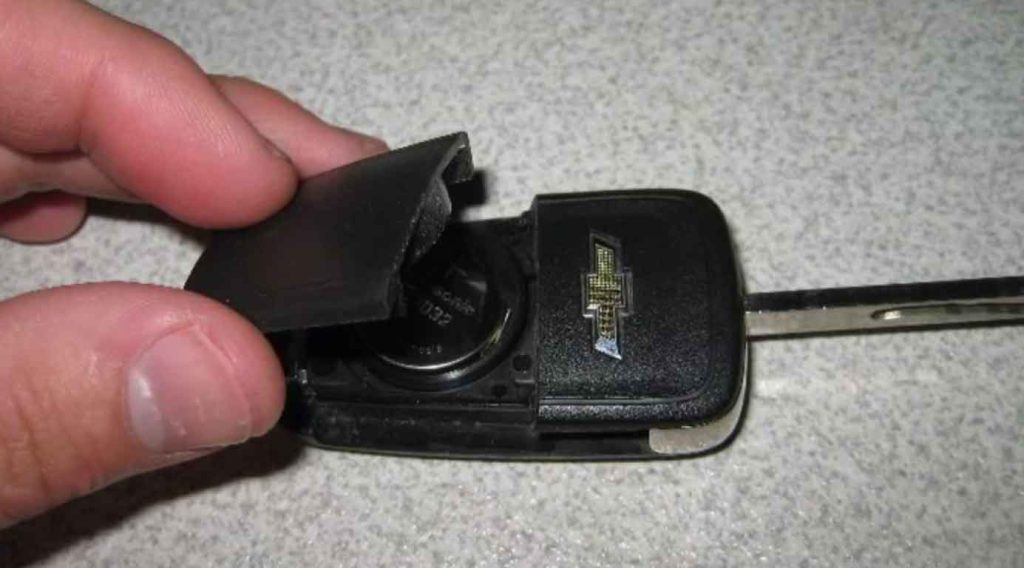
If your Cruze has a key fob, the battery might be dead.
Flip the fob over. You’ll see a small slot or screw.
Pop it open carefully. Note how the battery sits inside.
Buy the same battery type at any pharmacy or hardware store.
Install the new battery. Snap the fob back together.
Disconnect the Battery
This performs a “hard reset” on your car’s computers.
Remove the negative battery cable. Wait 15 minutes.
During this time, all the computers lose power. They reset to default settings.
Reconnect the cable. The theft system might reset itself.
Warning: You’ll lose radio presets and clock settings. Some cars need the radio code after battery disconnect.
When to See a Professional Mechanic
Some repairs need professional tools and training. Don’t feel bad about getting help.
Complex Electrical Issues
If you’ve tried the simple fixes and nothing works, the problem is deeper.
Tracing electrical problems takes special equipment. A good mechanic has:
- Professional scan tools (I use a Tech2 for GM vehicles)
- Wiring diagrams
- Digital multimeters
- Oscilloscopes
These tools cost thousands of dollars. They’re worth it for us, but not for one-time use.
BCM or ECM Replacement
Replacing control modules isn’t just plug-and-play. The new module needs programming.
Only dealers and some independent shops can program these modules. It requires factory software.
When I service a car like this, I connect to GM’s server. The programming takes 30-60 minutes.
You can’t do this in your driveway.
Ignition Cylinder Replacement
Replacing the ignition cylinder means working with your steering column. This involves your airbag system.
One wrong move and the airbag deploys. That’s dangerous and expensive.
Let a professional handle this job.
Key Programming
If you need a new key programmed, you need special equipment.
The dealer can do it. Some locksmiths can too. Independent shops like mine often have the tools.
The programming process syncs your new key with your car’s computer.
Cost of Repairs
Let me give you realistic price ranges. These are what I see in my area.
DIY Costs
- OBD-II scanner: $30-$100
- Battery: $100-$200
- Key battery: $3-$10
- Cleaning supplies: $10-$20
Total for DIY: $143-$330
Professional Repair Costs
Diagnostic Fee Most shops charge $100-$150 just to diagnose the problem. This fee often applies toward repairs.
Battery Replacement Parts: $100-$200 Labor: $30-$50 Total: $130-$250
Key Replacement and Programming New key: $150-$300 Programming: $50-$100 Total: $200-$400
Ignition Cylinder Replacement Parts: $150-$300 Labor: $150-$300 Total: $300-$600
BCM Replacement Parts: $200-$500 Programming: $100-$200 Labor: $200-$400 Total: $500-$1,100
Complete Theft System Repair For multiple failed components: $800-$2,000
These prices vary by location. Urban areas usually cost more.
How to Prevent Future Problems
Prevention is cheaper than repair. Follow these tips.
Maintain Your Battery
Replace your battery every 4-5 years. Don’t wait for it to die.
Clean the terminals once a year. Check the connections twice a year.
If you live in a cold climate, consider a battery blanket. Cold kills batteries faster.
Use Your Spare Key Sometimes
Don’t let your spare key sit unused for years. Use it once a month.
This keeps it in good working order. You’ll know immediately if it stops working.
Keep Keys Clean and Dry
Water damages transponder chips. Keep your keys away from:
- Swimming pools
- Washing machines
- Toilets (yes, this happens)
If your key gets wet, dry it immediately. Take it apart if possible.
Address Warning Lights Promptly
Don’t ignore warning lights. They tell you something needs attention.
Small problems become big problems when ignored. A $50 fix today might cost $500 next month.
Use Quality Parts
Cheap aftermarket keys often don’t work right. They might work for a while, then fail.
In my shop, I’ve seen too many problems with bargain keys. Spend the extra money for quality.
Regular Maintenance
Your Cruze needs regular checkups. During oil changes, ask your mechanic to check:
- Battery health
- Electrical connections
- Computer system updates
Catching problems early saves money.
Frequently Asked Questions
Can I drive with the service theft deterrent system warning?
If your car starts and runs, you can drive it. But get it checked soon.
The system might fail completely. Then you’ll be stranded.
Will disconnecting the battery fix the problem permanently?
Sometimes yes, sometimes no. Battery disconnection resets the system.
If the underlying problem isn’t fixed, the warning comes back. It might take days or weeks.
How long does the 10-minute reset take?
Despite the name, it often takes 10-15 minutes per cycle. You might need three cycles.
Plan for 30-45 minutes total. Bring a book or your phone.
Can AutoZone or O’Reilly program my key?
Most auto parts stores can’t program keys. They can cut keys and replace fob batteries.
For programming, see a dealer, locksmith, or qualified mechanic.
Is this covered under warranty?
If your Cruze is under warranty, this repair might be covered. Check your warranty documents.
Powertrain warranties usually don’t cover the theft system. Comprehensive warranties might.
Can I disable the theft deterrent system?
Technically yes, but I don’t recommend it. You lose theft protection.
Also, disabling it might void your insurance. Check with your insurance company first.
Why does my car start sometimes but not others?
Intermittent problems usually mean:
- Loose connection
- Failing sensor
- Weak battery
- Damaged key
These parts work until they get warm, cold, or vibrated wrong. Then they fail temporarily.
Conclusion
The Service Theft Deterrent System warning doesn’t mean your Cruze is junk. Most causes have simple fixes.
Start with the easy stuff:
- Check your battery
- Try your spare key
- Do the 10-minute reset
- Clean your connections
These simple steps solve many problems. They cost almost nothing to try.
If simple fixes don’t work, see a professional. The repair might cost a few hundred dollars. That’s better than a car you can’t drive.
From years under the hood, I’ve learned one thing: Don’t panic when you see this warning. Stay calm. Work through the steps.
Most drivers get their Cruze running again within a day. You can too.
Take care of your car. It will take care of you.
Remember: Your theft deterrent system usually works perfectly. When it doesn’t, now you know what to do.
Drive safe!