
Monday to Saturday - 9:00 am -18:00 pm

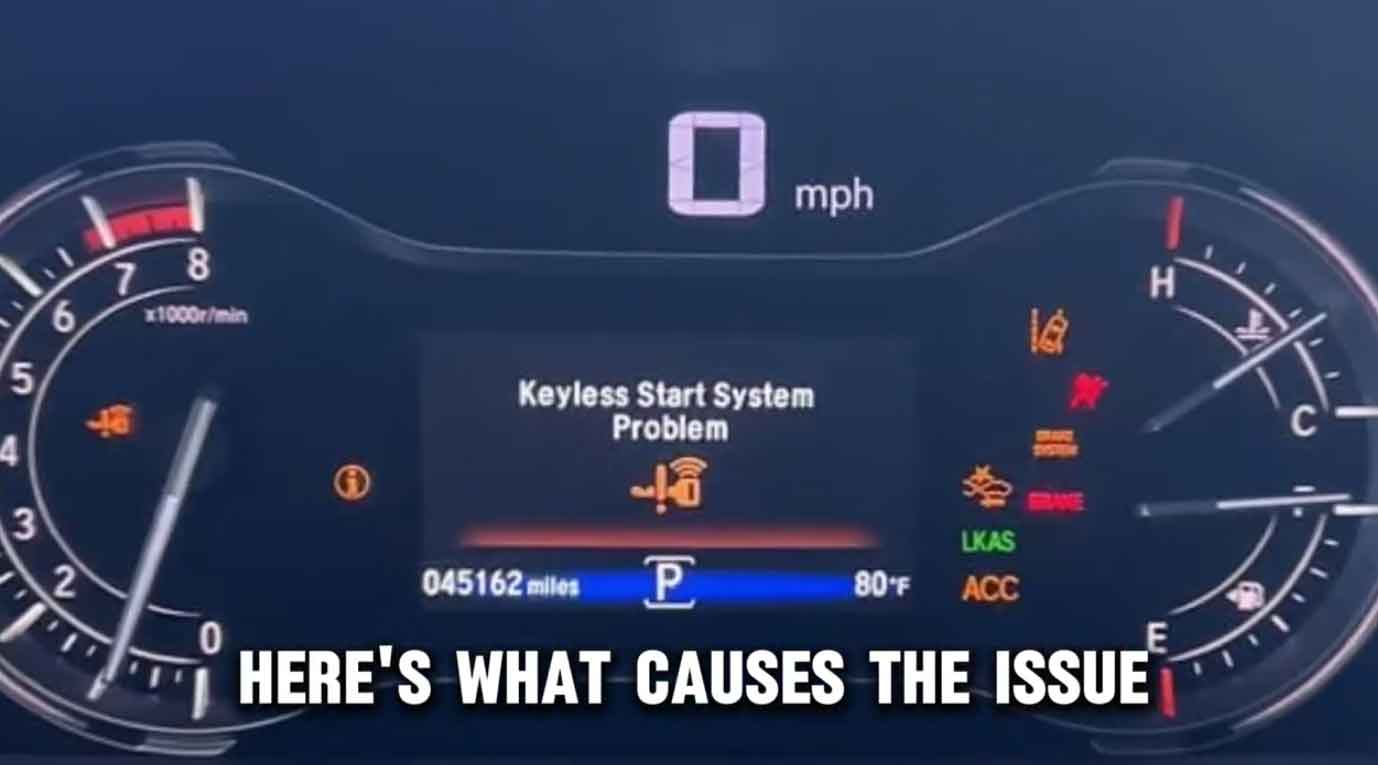
Is your Honda Pilot refusing to start with the push of a button? You’re not alone in this frustration.
From years under the hood, I’ve seen countless drivers walk into the shop with the same headache. Their smart key won’t cooperate, and they’re stuck in the driveway.
The good news? Most keyless start problems have simple fixes. This guide walks you through the real-world solutions that actually work.
We’ll cover everything from dead fob batteries to weather-related glitches. You’ll learn exactly what to check, when to grab your toolbox, and when to call in the pros.
Let’s get your Pilot starting smoothly again.
Understanding Your Honda Pilot’s Keyless Entry System
Your Pilot’s keyless system is smarter than traditional keys. It’s a radio-based technology that talks to your vehicle.
When you walk up with the fob in your pocket, sensors detect the signal. The car unlocks automatically in most cases.
Press the start button, and the engine fires up. No twisting, no fumbling with keys in the dark.
Inside the fob is a tiny computer chip. It sends encrypted codes that only your specific Pilot can understand. This keeps thieves from copying the signal.
Understanding this basic setup helps when things go wrong. You’ll know where to look first.
Warning Signs Your Keyless Start Is Failing
In my shop, customers describe the same red flags over and over. Recognizing them early saves you headaches later.
The most obvious sign? Your Pilot won’t start when you press the button. The dashboard lights up, but nothing happens when you push.
Sometimes the key fob stops unlocking the doors. You press the button repeatedly with no response. This usually points to a fob issue, not the car.
Dashboard warning messages are another clue. You might see “Key Fob Not Detected” or “Check Smart Key System” on the display.
Strange noises tell a story too. A rapid clicking sound often means electrical problems. A single click usually points to the battery or starter.
Door locks acting weird? If they randomly lock and unlock, the system is confused. It’s trying to communicate but can’t get a clear signal.
Pay attention to these symptoms. They guide your troubleshooting process.
Honda Pilot Keyless Start System Problem: Root Causes and Quick Fixes
Most keyless start failures trace back to a handful of common culprits. Let me break down what I see most often.
Dead or Weak Key Fob Battery
This is the number one problem in my experience. The small battery inside your fob doesn’t last forever.
A dying battery causes frustrating symptoms. Your range drops from 30 feet to just a few inches. You have to stand right next to the car for it to respond.
The fix is simple and cheap. Pop open the fob casing with a flathead screwdriver. Swap the old battery for a fresh CR2032 (check your manual for the exact type).
I keep these batteries in my toolbox because they’re needed so often. They cost about two dollars at any drugstore.
After replacing the battery, test the fob from different distances. It should work from at least 20 feet away.
Weather and Temperature Problems
Extreme temperatures mess with electronics. I’ve seen this countless times during cold snaps and heat waves.
In winter, batteries lose power faster. The fob signal also weakens in freezing conditions. Warming the fob in your hands for 30 seconds often helps.
Summer heat causes different issues. High temperatures can damage the fob’s internal circuits over time. Keep your fob out of direct sunlight when possible.
Rain and humidity create problems too. Water can seep into the fob through tiny cracks. If your fob got wet, take out the battery immediately. Let everything dry for 24 hours before testing again.
Interference From Other Electronics
Radio signals don’t play nice with each other sometimes. Your fob operates on a specific frequency that can get jammed.
Cell phone towers, power lines, and other wireless devices create interference. Parking garages with thick concrete walls block signals effectively.
When I service a car like this, I test it in different locations. If the fob works in one spot but not another, interference is likely the culprit.
Metal objects near the fob can shield the signal too. Keys on the same ring sometimes cause problems. Try separating your car fob from other metal items.
Diagnosing the Problem Step-by-Step
Before you start taking things apart, do some detective work. A methodical approach saves time and money.
Start by testing the obvious stuff first. Is the fob battery actually dead? Swap it out and see if that fixes everything.
Try standing at different distances from your Pilot. If the fob only works when you’re touching the car, signal strength is your problem.
Check for physical damage on the fob. Cracks, water damage, or broken buttons all cause failures. Hold it up to the light and inspect closely.
If you have a spare fob, use it now. Does the spare work perfectly? Then your original fob is faulty. Does the spare also fail? The problem is in the car’s receiver system.
Look at your dashboard for error codes. Modern Pilots display specific messages that point to the issue. Write down exactly what you see.
Test the fob’s buttons one by one. Lock, unlock, trunk release, panic button. If some work and others don’t, internal circuits are failing.
Document everything you find. This information helps the dealer diagnose faster if you need professional help.
How To Fix a Non-Responsive Key Fob
Most fob problems get solved right in your driveway. Here’s my proven troubleshooting sequence.
Changing the Battery Correctly
Grab a small flathead screwdriver and your replacement battery. I use CR2032 batteries for most Honda fobs, but double-check your owner’s manual.
Look for the small slot on the fob’s edge. Gently insert the screwdriver and twist to pop the case open. Don’t force it or you’ll crack the plastic.
Note which side of the battery faces up before removing it. The positive side usually goes up, marked with a plus sign.
Pop out the old battery with the screwdriver tip. Drop in the new one with the correct side facing up.
Snap the fob case back together firmly. You should hear a click when it’s seated properly.
Test immediately by pressing the lock button while standing 20 feet from your Pilot. If it works, you’re done. If not, keep troubleshooting.
Testing With Your Backup Key Fob
Your Pilot came with two key fobs from the factory. Dig out the spare from your junk drawer.
Stand in the same spot where the main fob failed. Press the spare’s lock button and watch the car’s response.
If the spare works flawlessly, your original fob is definitely broken. You’ll need a replacement from the dealer.
If the spare also fails, the problem lives in the car’s receiver system. This requires deeper diagnosis.
When both fobs work intermittently, check for interference first. Move the car to a different location and retest.
Repairing Your Honda Pilot’s Keyless Start System
Sometimes the fob is fine, but the car’s system needs attention. These repairs require more technical skill.
Replacing a Faulty Start/Stop Button Assembly
In my experience, the start button itself rarely fails. But when it does, replacement is the only fix.
You’ll need to remove dashboard trim panels to access the button assembly. Use plastic pry tools to avoid scratching the finish.
Disconnect the wiring harness from the back of the old button. It usually has a clip that you squeeze to release.
Install the new button assembly from a genuine Honda parts dealer. Aftermarket parts don’t always work reliably with the smart key system.
Reconnect the wiring harness carefully. Make sure it clicks into place securely.
Reassemble the dashboard trim in reverse order. Test the new button before snapping everything back together permanently.
This job takes about 90 minutes if you’re handy with tools. Take photos as you disassemble things to remember how they go back.
Simple DIY Repairs You Can Try First
Before spending money on parts, try these no-cost fixes. They work more often than you’d think.
Reset the vehicle’s computer by disconnecting the negative battery cable. Wait 15 minutes, then reconnect it. This clears temporary glitches.
Check all electrical connectors under the dashboard. Sometimes they work loose from vibration. Push them together firmly until they click.
Clean the battery terminals on both the car and the fob. Corrosion blocks electrical flow. Use a pencil eraser to clean fob battery contacts.
Inspect the start button for stuck positions. Press it multiple times to work it loose if it feels sticky.
Test the brake pedal switch. The car won’t start unless it detects the brake is pressed. If this switch fails, nothing happens when you push start.
When To Take Your Pilot to the Dealership
DIY fixes have limits. Some problems need factory diagnostic equipment and certified technicians.
You’ve tried replacing batteries and using the spare fob with no luck. The problem persists despite your best efforts. Time to call the dealer.
If weird electrical symptoms keep appearing, something deeper is wrong. Random error messages or systems turning on by themselves indicate module failures.
Warranty coverage matters here. If your Pilot is still under factory or extended warranty, repairs may cost nothing. Don’t void coverage by doing major work yourself.
Multiple trips to the car refuse to start creates a pattern. Intermittent problems are hardest to diagnose. The dealer’s computer can read fault codes you can’t access.
Before your appointment, gather all documentation. Write down when problems occur, what you’ve tried, and any error messages. This speeds up diagnosis significantly.
Expect the dealer to test the fob, check all system modules, and scan for fault codes. They have Honda-specific equipment that reads data we can’t see.
Preventing Future Keyless Start Problems
Smart maintenance keeps your system running smoothly. Here’s what I recommend based on years of experience.
Replace fob batteries annually whether they seem weak or not. Prevention beats roadside emergencies every time.
Keep a spare fob in working condition. Test it monthly to ensure it’s ready when needed.
Protect your fobs from physical damage. Don’t throw them, sit on them, or drop them repeatedly. The circuits inside are delicate.
Avoid extreme temperature exposure. Don’t leave fobs on the dashboard in summer or outside overnight in winter.
Clean your fob regularly. Dirt and grime work into the button mechanisms over time. Wipe it down with a damp cloth monthly.
Check for software updates at your dealer during routine service. Honda occasionally releases updates that improve system reliability.
Final Thoughts
Most Honda Pilot keyless start problems are fixable at home. A fresh battery solves the majority of issues in minutes.
When simple fixes don’t work, you’ve learned to diagnose deeper. You know what to check, what to test, and when to stop.
The key is staying calm and working methodically. Don’t throw parts at the problem randomly.
If DIY troubleshooting doesn’t resolve it, professional help is worth the cost. Dealerships have tools and knowledge that justify their rates.
Keep this guide handy for reference. Share it with other Pilot owners who might be struggling.
Your keyless start system should provide convenience, not frustration. With proper care and quick troubleshooting, it will.
Frequently Asked Questions
What do I do when my Honda Pilot key fob stops responding?
Start with a battery replacement. Pop open the fob and install a fresh CR2032 battery. If that doesn’t work, test your spare fob. This tells you if the problem is the fob or the car’s system.
How can I troubleshoot my Pilot’s keyless start when it fails?
Check the fob battery first. Test the fob’s range by standing at different distances from the car. Inspect the start button for physical damage. If these checks don’t reveal anything, error codes at the dealer will.
Why won’t my push button start work in cold weather?
Cold temperatures drain battery power faster. The fob’s signal also weakens in freezing conditions. Warm the fob in your hands for 30 seconds before trying again. Keep fresh batteries installed during winter months.
What are the typical signs of keyless start failure?
The car won’t start when you press the button. Your fob doesn’t unlock doors. Dashboard warning lights appear. You hear clicking noises when attempting to start. Locks act erratically without touching the fob.
How do I replace my Honda Pilot key fob battery?
Use a small flathead screwdriver to pop open the fob case at the seam. Note which direction the battery faces. Remove the old battery and insert a new CR2032 with the positive side up. Snap the case closed and test.
When should I visit a Honda dealer for keyless start issues?
If multiple DIY attempts fail to fix the problem, get professional help. When the issue comes back repeatedly, deeper problems exist. If your Pilot is under warranty, let the dealer handle repairs to maintain coverage.
Can weather and environment cause keyless entry problems?
Yes, extreme heat and cold affect electronic systems. Rain can damage fobs if water gets inside. Concrete structures and metal objects block radio signals. Electronic interference from power lines and cell towers disrupts communication.
How do I reset my Honda Pilot’s keyless start system?
Disconnect the negative battery cable for 15 minutes. This clears the computer’s temporary memory. Reconnect the cable and test the system. For detailed reset procedures, consult your owner’s manual or dealer service department.